Web Wiz - Green Windows Web Hosting - Celebrating 25 Years!

Change Hosting Control Panel Password


If you have forgotten or lost the password you use to log in to your Hosting Control Panel, this article shows you how to reset it. Before resetting, check you are entering your hosting account name as the username and not your email address, as that is the usual cause of a failed login.

1. Go to https://www.ControlPanelLive.net

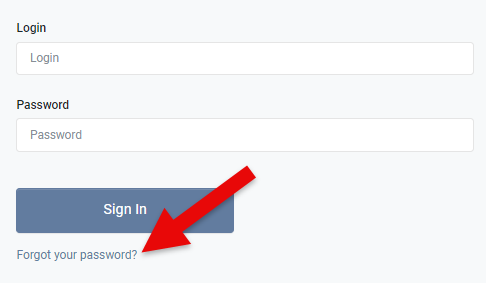
2. On the Sign In to Control Panel page click on Forgot your password?, or go straight to https://www.controlpanellive.net/auth/password-reset

Signin Form

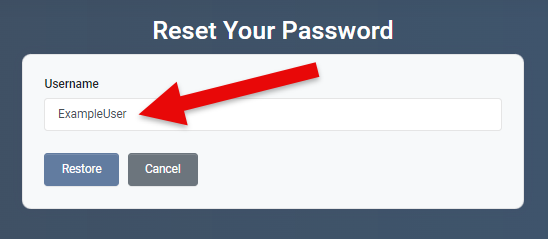
3. On the Reset Your Password page enter your hosting account username. This is your hosting account name, not your email address. Entering an email address here is the most common reason a reset fails.

Reset Password

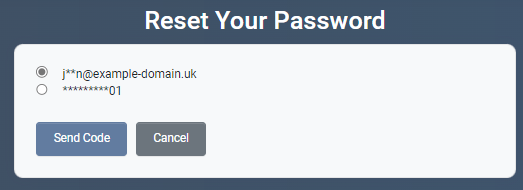
4. Select where you want to have the password reset code sent to, you can choose either your email address or if you have added your mobile number in to your control panel profile, you can have the reset code sent by SMS text message

Reset Password

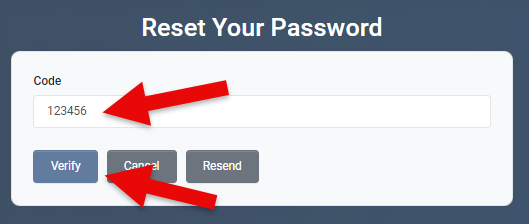
5. Enter the Reset Code that you received by email or text message, and then click Verify

Reset Password

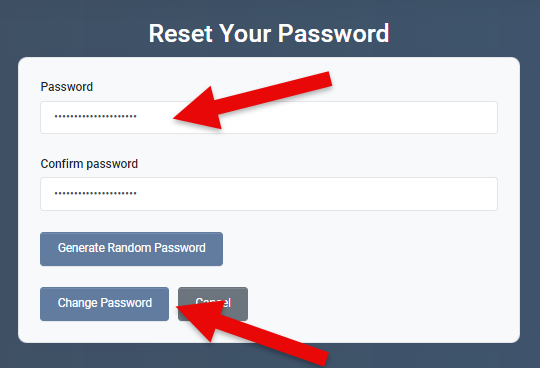
6. Enter your new password, ensuring that that it meets the password policy, and click Change Password

Reset Password


Back To Hosting Control Panel Tutorials Menu

Become a Fan on Facebook Follow us on X Connect with us on LinkedIn Web Wiz Blogs
About Web Wiz | Contact Web Wiz | Terms & Conditions | Cookies | Privacy Notice

Web Wiz® is the trading name of Web Wiz Ltd. Company registration No. 05977755. Registered in England and Wales.
Registered office: Web Wiz Ltd, Unit 18, The Glenmore Centre, Fancy Road, Poole, Dorset, BH12 4FB, UK.

Prices exclude VAT at 20% unless otherwise stated. VAT No. GB988999105 - $, €, prices shown as a guideline only.

Copyright ©2001-2026 Web Wiz® Ltd. All rights reserved.